
With the tax deadline approaching and new regulations like CARF and DAC8 increasing transparency around crypto reporting, proper documentation of your portfolio is more important than ever.
Use quieter market phases to review your data in Blockpit: import all exchanges and wallets, resolve open tips, and improve your Account Health. This helps ensure that your portfolio is fully documented and that your tax report can be generated accurately—without unnecessary tax risk.
In short: If you review your transactions now, preparing your tax report later becomes almost automatic.
Why Proper Documentation Is Now Essential
Regulation in the crypto space is becoming stricter. With CARF, transactions from crypto exchanges and wallet providers are already being recorded today and will be automatically reported to tax authorities starting in 2027. Exchanges and platforms are required to report relevant transaction data.
This means that incomplete or inconsistent transaction histories will become much harder to explain in the future.
<div class="card_body_small infobox margin-bottom_medium margin-top_small"><div class="flex_horizontal-copy gap-xxsmall margin-bottom_xxsmall"><div class="icon_small is-infobox w-embed"><svg xmlns="http://www.w3.org/2000/svg" width="24" height="24" viewBox="0 0 24 24" fill="none">
<path fill-rule="evenodd" clip-rule="evenodd" d="M2.25 12C2.25 6.61522 6.61522 2.25 12 2.25C17.3848 2.25 21.75 6.61522 21.75 12C21.75 17.3848 17.3848 21.75 12 21.75C6.61522 21.75 2.25 17.3848 2.25 12ZM10.9562 10.5584C12.1025 9.98533 13.3931 11.0206 13.0823 12.2639L12.3733 15.0999L12.4148 15.0792C12.7852 14.894 13.2357 15.0441 13.421 15.4146C13.6062 15.7851 13.4561 16.2356 13.0856 16.4208L13.0441 16.4416C11.8979 17.0147 10.6072 15.9794 10.9181 14.7361L11.6271 11.9001L11.5856 11.9208C11.2151 12.1061 10.7646 11.9559 10.5793 11.5854C10.3941 11.2149 10.5443 10.7644 10.9148 10.5792L10.9562 10.5584ZM12 9C12.4142 9 12.75 8.66421 12.75 8.25C12.75 7.83579 12.4142 7.5 12 7.5C11.5858 7.5 11.25 7.83579 11.25 8.25C11.25 8.66421 11.5858 9 12 9Z" fill="#1A73E8"></path>
</svg></div><div class="label"><span class="text_bold text-color-blue">Good to know</span></div></div><div class="label">By now at the latest, you should ensure that your <strong id="">complete crypto history is properly documented</strong>—not only for your tax return, but also to avoid potential legal issues. And did you know? <a id="" href="/crypto-portfolio-tracker">Portfolio tracking is completely free</a> with Blockpit—no strings attached.</div></div>
Step 1: Make Sure All Your Data Is in Blockpit
Before resolving tips or generating your tax report, you should first check whether all relevant data has been imported into Blockpit. Your tax report can only be calculated correctly if your complete transaction history is available.
Quick checklist:
- Are all crypto exchanges connected?
- Have you imported all wallets?
- Did you include old accounts that you may no longer use today but used in the past?
- Have you considered DeFi, staking, or trading bots?
Goal: Your portfolio in Blockpit should reflect your entire crypto history. Only then can your tax report be generated accurately. For all integrations, you can find detailed step-by-step guides in the Blockpit Help Center explaining how to set up connections and import your data.
<div class="card_body_small infobox green margin-bottom_medium margin-top_small"><div class="flex_horizontal gap-xxsmall margin-bottom_xxsmall"><div class="icon_small is-infobox w-embed"><svg xmlns="http://www.w3.org/2000/svg" width="24" height="24" viewBox="0 0 24 24" fill="none">
<path d="M7.49281 18.5C7.06823 18.5 6.67296 18.2635 6.51759 17.8684C6.18349 17.0187 6 16.0933 6 15.125C6 13.3759 6.59874 11.7667 7.60244 10.491C7.75335 10.2993 7.97456 10.1821 8.20214 10.094C8.67496 9.91091 9.09254 9.57968 9.4141 9.16967C10.1873 8.18384 11.1617 7.3634 12.2755 6.77021C12.9977 6.38563 13.6243 5.81428 13.9281 5.05464C14.1408 4.5231 14.25 3.95587 14.25 3.38338V2.75C14.25 2.33579 14.5858 2 15 2C16.2426 2 17.25 3.00736 17.25 4.25C17.25 5.40163 16.9904 6.49263 16.5266 7.46771C16.261 8.02604 16.6336 8.75 17.2519 8.75H20.3777C21.4044 8.75 22.3233 9.44399 22.432 10.4649C22.4769 10.8871 22.5 11.3158 22.5 11.75C22.5 14.5976 21.5081 17.2136 19.851 19.2712C19.4634 19.7525 18.8642 20 18.2462 20H14.2302C13.7466 20 13.2661 19.922 12.8072 19.7691L9.69278 18.7309C9.23393 18.578 8.75342 18.5 8.26975 18.5H7.49281Z" fill="#4CAF50"></path>
<path d="M2.33149 10.7271C1.79481 12.0889 1.5 13.5725 1.5 15.125C1.5 16.3451 1.68208 17.5226 2.02056 18.632C2.27991 19.482 3.10418 20 3.99289 20H4.90067C5.3462 20 5.62137 19.5017 5.42423 19.1022C4.83248 17.9029 4.5 16.5528 4.5 15.125C4.5 13.4168 4.97588 11.8198 5.8023 10.4593C6.0473 10.0559 5.77404 9.5 5.30212 9.5H4.24936C3.41733 9.5 2.63655 9.95303 2.33149 10.7271Z" fill="#4CAF50"></path>
</svg></div><div class="label"><span class="text_bold text-color-blue">Tip</span></div></div><div class="label">With <a id="" href="/blockpit-plus"><strong id="">Blockpit Plus</strong></a>, your integrations sync automatically every day—keeping your transactions up to date with less hassle.</div></div>
Step 2: Resolve Tips and Improve Your Account Health
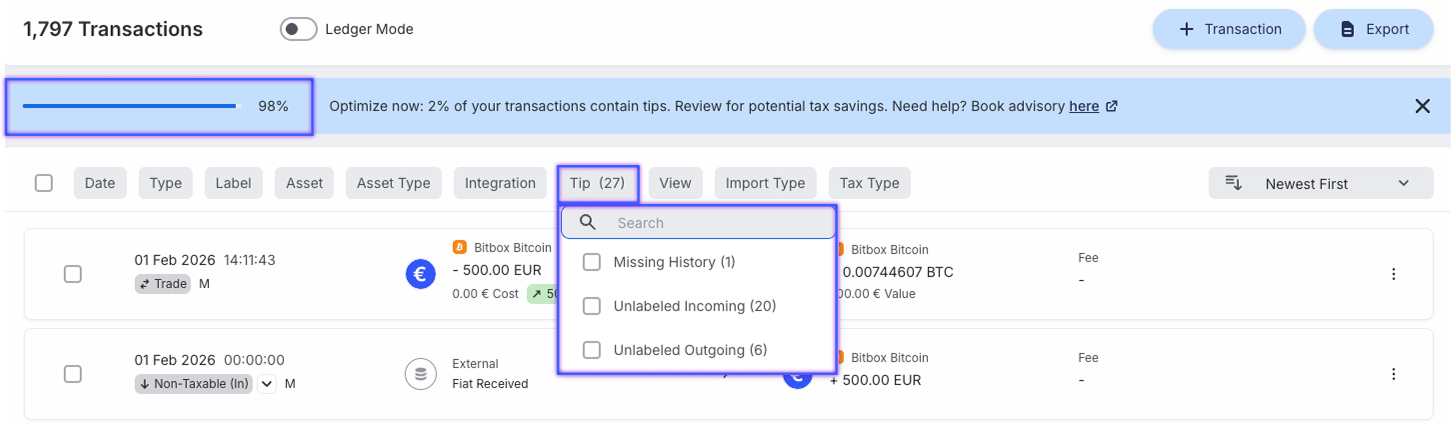
Once your transactions are imported, it’s worth checking the tips in your Blockpit account.
Tips are automatic indicators that highlight when something in your transaction history is incomplete, unclear, or inconsistent. They help you identify potential problems early and improve the quality of your data.
The more tips you resolve, the higher your Account Health becomes. This metric represents the percentage of transactions without unresolved tips, and ideally it should be as close to 100% as possible. High data quality ensures that your tax report can be calculated accurately.
<div class="card_body_small infobox margin-bottom_medium margin-top_small"><div class="flex_horizontal-copy gap-xxsmall margin-bottom_xxsmall"><div class="icon_small is-infobox w-embed"><svg xmlns="http://www.w3.org/2000/svg" width="24" height="24" viewBox="0 0 24 24" fill="none">
<path fill-rule="evenodd" clip-rule="evenodd" d="M2.25 12C2.25 6.61522 6.61522 2.25 12 2.25C17.3848 2.25 21.75 6.61522 21.75 12C21.75 17.3848 17.3848 21.75 12 21.75C6.61522 21.75 2.25 17.3848 2.25 12ZM10.9562 10.5584C12.1025 9.98533 13.3931 11.0206 13.0823 12.2639L12.3733 15.0999L12.4148 15.0792C12.7852 14.894 13.2357 15.0441 13.421 15.4146C13.6062 15.7851 13.4561 16.2356 13.0856 16.4208L13.0441 16.4416C11.8979 17.0147 10.6072 15.9794 10.9181 14.7361L11.6271 11.9001L11.5856 11.9208C11.2151 12.1061 10.7646 11.9559 10.5793 11.5854C10.3941 11.2149 10.5443 10.7644 10.9148 10.5792L10.9562 10.5584ZM12 9C12.4142 9 12.75 8.66421 12.75 8.25C12.75 7.83579 12.4142 7.5 12 7.5C11.5858 7.5 11.25 7.83579 11.25 8.25C11.25 8.66421 11.5858 9 12 9Z" fill="#1A73E8"></path>
</svg></div><div class="label"><span class="text_bold text-color-blue">Good to know</span></div></div><div class="label"><strong id="">Good to know:</strong> Even if your Account Health is lower, a tax report can still be generated. In this case, Blockpit applies fallback logic to calculate your report. While the report remains usable, it may result in a higher tax burden rather than a lower one. By resolving tips, you can often improve the accuracy of your tax report and potentially reduce your tax liability.</div></div>
Below are the four most common tips you may encounter in Blockpit—and how you can resolve them quickly.
1. Unlabeled Transactions
This tip appears when a transaction does not yet have a label, meaning Blockpit cannot clearly determine what type of transaction it is. While many transactions are labeled automatically, some cases require manual classification.
Typical examples:
- A trade was not recognized correctly
- A transfer between two of your own wallets
- A deposit or withdrawal without a clear assignment
How to fix it:
- Open the affected transaction
- Assign the appropriate label (e.g., Trade, Transfer, Airdrop)
- Or connect related transactions to form a Trade or Transfer
If several transactions belong together, you can also edit them together or merge them to correctly represent the event.
2. Mismatched Balance
This tip occurs when the balance reported by the exchange or wallet (Synced Balance) does not match the balance calculated from your transactions (Calculated Balance). It usually indicates that some transactions may not have been imported correctly.
This commonly happens when:
- A deposit is missing
- A withdrawal was not imported
- A transfer between two accounts was not fully captured
How to fix it:
- Synchronize the integration again
- Check whether all transactions were imported completely
- Add missing transactions manually or via CSV import
3. Missing History
The “Missing History” tip appears when an asset leaves your account even though, according to your transaction history, it was never recorded as being in your balance.
Example:
You see an outgoing transaction of 1 BTC with the message “Missing history of 1 BTC”. This means that the previous transaction where 1 BTC entered the integration is missing.
This often happens when:
- An API only provides data from a certain date onward
- Older transactions were not imported
- A wallet or exchange was connected too late
How to fix it:
- Synchronize the integration again
- Check whether you can import older transactions via CSV
- Add missing transactions manually
- If necessary, recreate the integration to import the full history
4. Missing Value
This tip appears when Blockpit cannot determine a price or market value for a transaction.
This can happen for example with:
- Newly issued or very illiquid tokens
- DeFi assets
- Historical transactions without a price source
How to fix it:
- Review the asset value of the transaction
- Add the price manually so the correct market value can be calculated
<div class="card_body_small infobox green margin-bottom_medium margin-top_small"><div class="flex_horizontal gap-xxsmall margin-bottom_xxsmall"><div class="icon_small is-infobox w-embed"><svg xmlns="http://www.w3.org/2000/svg" width="24" height="24" viewBox="0 0 24 24" fill="none">
<path d="M7.49281 18.5C7.06823 18.5 6.67296 18.2635 6.51759 17.8684C6.18349 17.0187 6 16.0933 6 15.125C6 13.3759 6.59874 11.7667 7.60244 10.491C7.75335 10.2993 7.97456 10.1821 8.20214 10.094C8.67496 9.91091 9.09254 9.57968 9.4141 9.16967C10.1873 8.18384 11.1617 7.3634 12.2755 6.77021C12.9977 6.38563 13.6243 5.81428 13.9281 5.05464C14.1408 4.5231 14.25 3.95587 14.25 3.38338V2.75C14.25 2.33579 14.5858 2 15 2C16.2426 2 17.25 3.00736 17.25 4.25C17.25 5.40163 16.9904 6.49263 16.5266 7.46771C16.261 8.02604 16.6336 8.75 17.2519 8.75H20.3777C21.4044 8.75 22.3233 9.44399 22.432 10.4649C22.4769 10.8871 22.5 11.3158 22.5 11.75C22.5 14.5976 21.5081 17.2136 19.851 19.2712C19.4634 19.7525 18.8642 20 18.2462 20H14.2302C13.7466 20 13.2661 19.922 12.8072 19.7691L9.69278 18.7309C9.23393 18.578 8.75342 18.5 8.26975 18.5H7.49281Z" fill="#4CAF50"></path>
<path d="M2.33149 10.7271C1.79481 12.0889 1.5 13.5725 1.5 15.125C1.5 16.3451 1.68208 17.5226 2.02056 18.632C2.27991 19.482 3.10418 20 3.99289 20H4.90067C5.3462 20 5.62137 19.5017 5.42423 19.1022C4.83248 17.9029 4.5 16.5528 4.5 15.125C4.5 13.4168 4.97588 11.8198 5.8023 10.4593C6.0473 10.0559 5.77404 9.5 5.30212 9.5H4.24936C3.41733 9.5 2.63655 9.95303 2.33149 10.7271Z" fill="#4CAF50"></path>
</svg></div><div class="label"><span class="text_bold text-color-blue">Tip</span></div></div><div class="label">The tips above are the most common cases. You can find a more detailed explanation of all tips, along with step-by-step instructions for resolving them, in the <a id="" href="https://intercom.help/blockpit/en/articles/12137190-what-do-tips-mismatched-balance-missing-history-etc-mean-and-how-to-solve-them">Blockpit Help Center</a>.</div></div>
Keep your crypto portfolio tax-ready
Blockpit helps you detect inconsistencies in your data early. Tips clearly show where transactions are incomplete or unclear—and guide you step by step on how to fix them.
Need help? Ask Lia, our in-app assistant trained on the Blockpit Help Center and tax guides. She can answer your questions and connect you with a support agent if needed.